Preset Sound Levels
IRIS stores a preset list of speech efforts and background noise levels for quickly evaluating their effect on STI. These presets can be selected in a speech/noise scenario using the dropdown boxes.
Speech Efforts
Warning
The calculation to determine speech level from a specified speech effort requires a calibrated IRIS system and only applies to unamplified situations (e.g. a teacher in a classroom, or actor in a theatre).
The preset speech selection box will be disabled if G is not available.
A speech effort from the preset list can be selected using the dropdown box at the end of the speech level row in a speech/noise scenario.

The speech effort levels are not used directly as they are on-axis at 1 m from the source in a free field. However, IRIS uses these values to determine the speech level in combination with the measured sound strength (G).
The speech efforts defined in the preset list include:
- The omnidirectional unisex spectrum from ISO 3382-31 (for open plan office measurements)
- The directional vocal efforts from Cushing et al.2
- The directional male and female spectra from IEC 60268-163
See Anechoic Vocal Efforts for a description of the various efforts.
Warning
In order to measure G correctly and calculate the speech level at the receiver, you must calibrate and use your IRIS system with a source which matches the directivity of the selected speech effort.
Once you are confident your IRIS system has been calibrated correctly, select a desired speech effort and IRIS will populate the speech octave band values with the actual speech level at the receiver position.
Calibrating IRIS with a Directional Source
When calibrating an IRIS system with a directional source to measure G, it must be done on-axis using the free-field method. IRIS can use the resulting G value to determine the speech level at the receiver position.
Instructions for calibrating an IRIS system in a free field are provided here. Only one measurement on-axis is required (the IRIS calibration project should only contain one measurement). Please ignore any instructions specific to an omni-source, such as rotating the source to smooth its directional response.
Warning
This G value with a directional source is not compliant with the definition of sound strength in ISO 3382-1 since the source is not omnidirectional.
Background Noise Levels
A background noise level from the preset list can be selected using the dropdown box at the end of the background noise level row in a speech/noise scenario.

These values are copied directly into the background noise octave band fields.
The built-in background noise presets correspond to the values of the Noise Criterion (NC) curves, ranging from NC 15 to NC 65. While these exact curves may not be realistic, this is a conservative approach as they represent the worst-case background noise level for a specific NC value.
Edit Preset Sound Levels
To view or edit the preset list of speech and noise levels, open Define Preset Sound Levels in the Project menu.
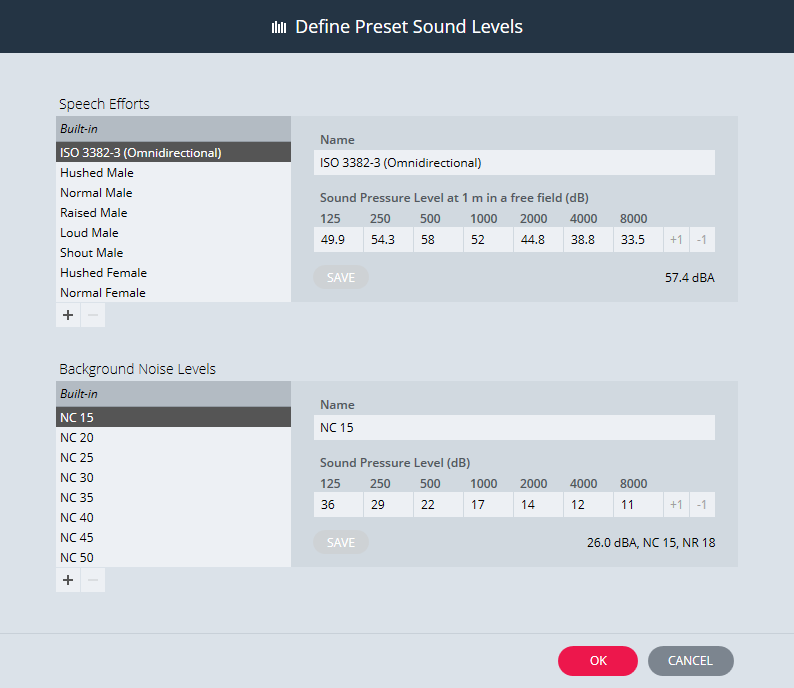
Click on the + button to create a custom entry based on the selected item. The custom entry will appear at the bottom of the list under User-Defined.
-
International Standard ISO 3382-3 Ed. 1, Acoustics – Measurement of room acoustic parameters – Part 3: Open plan offices (2012). ↩
-
I. Cushing, F. Li, T. Cox, K. Worrall, T. Jackson, Vocal efforts in anechoic conditions, Appl. Acoust. 72 (2011) 695 -701. ↩
-
International Standard IEC 60268-16 Ed. 4.0, Sound system equipment - Part 16: Objective rating of speech Intelligibility by speech transmission index (2011). ↩
-
ITU-T P.51, Telephone transmission quality - Objective measuring apparatus - Artificial mouth ↩