Level Reference
By default, a level of 0 dB in an IRIS plot corresponds to the broadband direct sound (the first window), meaning each plot is normalised to itself.
If you wish to compare multiple IRIS plots in level, assign one measurement as the IRIS Plot Reference. IRIS plot levels will then be relative to this reference measurement.
Set Level Reference
-
Choose a measurement to use as the reference. Generally, the loudest one (closest to the source) is a good option.
-
With that measurement selected, select Set as IRIS Plot Reference from the Measurement menu.

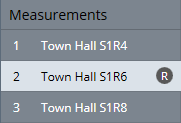
The reference measurement is indicated by an R in the measurement list.
-
In the IRIS plot view, the Level Reference should now be set to Global. The number in brackets is the measurement number.
Clear Level Reference
To clear the level reference, select Clear IRIS Plot Reference from the Measurement menu.

Warning
This level reference feature only works if the sound source amplifier was not adjusted in during a measurement session. If you need to adjust the volume of the source mid session, always use the output gain slider in the Record Measurement window.